

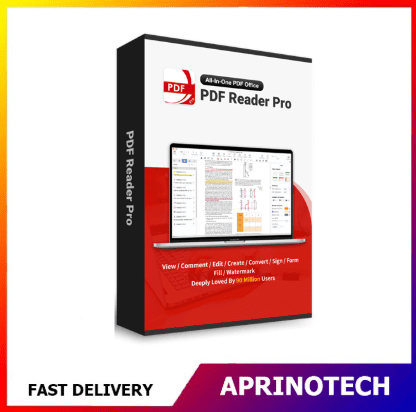


PDF Reader Pro for Mac Premium Plan Perpetual 1 Device
Rp1.803.750
PDF Reader Pro for Mac Premium Plan Perpetual 1 Device
PDF Reader Pro for Mac Premium Plan Perpetual 1 Device is a professional PDF management solution designed for Mac users who need to read, edit, annotate, organize, convert, sign, and manage PDF documents from a single device.
It provides a practical workspace for students, professionals, businesses, researchers, and home users who regularly work with PDF files and need more functionality than a basic PDF reader.
📄 Comprehensive PDF Management
PDF Reader Pro provides tools for handling PDF documents throughout the document workflow.
Users can work with PDFs for:
- Reading
- Editing
- Reviewing
- Annotating
- Organizing
- Signing
- Converting
- Sharing
- Printing
- Document management
This makes it suitable for everyday PDF tasks as well as more advanced document workflows.
✏️ Edit PDF Documents
PDF Reader Pro allows users to make changes to PDF content without relying entirely on the original document-editing application.
Depending on the supported document features, users can work with:
- Text
- Images
- Links
- PDF objects
- Document elements
- Page content
This can be useful when users receive PDF documents that require corrections or minor revisions.
📝 Annotate & Review PDFs
PDF annotation tools are useful for reviewing documents, academic materials, contracts, reports, and technical files.
Users can add:
- Highlights
- Underlines
- Strikethroughs
- Notes
- Text boxes
- Shapes
- Drawing marks
- Comments
These features make PDF Reader Pro suitable for collaborative review and document feedback.
📚 Reading & Document Review
PDF Reader Pro provides a dedicated environment for reading PDF documents on macOS.
Users can review:
- Reports
- E-books
- Research papers
- Manuals
- Business documents
- Contracts
- Presentations
- Technical documentation
PDF files can be viewed and reviewed without requiring the original application used to create the document.
🔍 Search & Navigation
Working with large PDF documents can be easier with document search and navigation tools.
Users can locate information within documents and move between relevant sections.
This is useful for:
- Research papers
- Academic journals
- Manuals
- Legal documents
- Business reports
- Technical documentation
- Long-form publications
🗂️ PDF Page Management
PDF Reader Pro can help users manage the structure of PDF documents.
Common page-management tasks include:
- Rearranging pages
- Rotating pages
- Deleting pages
- Extracting pages
- Combining documents
- Splitting PDFs
These capabilities can simplify document organization when working with multiple PDF files.
🔄 Merge & Split PDF Documents
Users may need to combine multiple PDF documents into one file or separate selected pages from a larger document.
For example:
Multiple PDF Files → Merge → One Organized PDF
or:
Large PDF → Select Pages → Extract / Split → Separate PDF
This is useful for reports, project documentation, academic assignments, and business records.
📑 PDF Conversion
PDF Reader Pro can provide document conversion capabilities for users who need to move information between PDF and other document formats.
Conversion workflows may be useful for:
- Editing PDF content
- Reusing document information
- Creating editable files
- Preparing documents for further processing
Users should verify the exact file formats supported by the specific Premium Plan version.
🖼️ PDF Image & Content Handling
PDF documents frequently contain text, images, graphics, and other objects.
PDF Reader Pro can help users manage these elements when editing or reviewing PDF files.
This can be useful for:
- Business brochures
- Reports
- Technical documents
- Academic papers
- Product documentation
- Presentations
✍️ Digital Signatures
Electronic signatures can simplify document approval and signing workflows.
Users can apply signatures to PDF documents for purposes such as:
- Business forms
- Agreements
- Internal documents
- Applications
- Administrative paperwork
- Professional correspondence
Signature functionality can reduce the need to print, manually sign, scan, and return documents.
🔐 PDF Security & Protection
PDF documents may contain confidential or sensitive business information.
PDF Reader Pro provides tools intended to help users manage document protection and security features supported by PDF.
Depending on the document and software version, users may work with:
- Password protection
- Permission settings
- Document restrictions
- Secure PDF workflows
Users should verify the exact security capabilities included in their licensed version.
🧾 Forms & Business Documents
PDF forms are commonly used by businesses, educational institutions, and organizations.
PDF Reader Pro can help users work with PDF-based administrative documents such as:
- Application forms
- Business forms
- Registration documents
- Internal paperwork
- Agreements
- Reports
- Invoices
This can help reduce the need for printing and manual document handling.
🎓 Academic & Student Applications
PDF Reader Pro for Mac can be useful for students and researchers who frequently work with digital documents.
Potential applications include:
- Reading research papers
- Annotating lecture materials
- Reviewing journal articles
- Organizing assignments
- Signing academic forms
- Managing thesis documents
- Combining research materials
- Creating study notes
Students can use annotation tools to highlight important information and add notes directly to PDF documents.
🏢 Business & Office Applications
Professionals can use PDF Reader Pro for everyday document workflows.
Potential applications include:
- Contract review
- Report editing
- Document approval
- PDF signing
- Administrative paperwork
- Internal document review
- Digital document organization
This can make PDF-based workflows more convenient for employees who work primarily on Mac computers.
👨💻 Professional Document Workflow
A typical PDF workflow can be:
Receive PDF → Read → Review → Annotate → Edit → Sign → Organize → Share
PDF Reader Pro can provide tools for several of these stages within one application.
This reduces the need to switch between multiple PDF utilities for common document-management tasks.
🖥️ Designed for Mac Users
This product is specifically intended for macOS users.
It can be suitable for individuals who primarily use Mac computers for:
- Education
- Business
- Research
- Administration
- Creative work
- Personal document management
Before purchasing, users should verify the supported macOS versions for the specific PDF Reader Pro release associated with the license.
👤 1 Device License
The 1 Device license is intended for use on a single authorized device, subject to the applicable licensing terms.
This makes the product suitable for individual Mac users who need PDF functionality on one primary computer.
It can be appropriate for:
- Individual professionals
- Students
- Researchers
- Home users
- Freelancers
- Small-business users
Users requiring access across multiple devices should consider an appropriate multi-device or multi-user licensing option.
♾️ Perpetual License
The Perpetual licensing model is designed for long-term use of the licensed software version rather than a recurring annual subscription.
This can be attractive to users who prefer a one-time purchase and long-term access to the licensed product.
A perpetual license should be distinguished from subscription-based plans, where continued access may depend on maintaining an active subscription.
The exact rights associated with future major versions, upgrades, and support depend on the applicable license terms.
⭐ Premium Plan
The Premium Plan is intended for users who need more advanced PDF functionality than a basic PDF reading application.
Depending on the specific version and license terms, Premium features may include tools for:
- PDF editing
- Annotation
- Document conversion
- Page management
- PDF signing
- Form handling
- Document organization
- Advanced PDF workflows
Users should verify the exact feature set included with the purchased version.
🔄 Efficient Digital Document Workflow
PDF Reader Pro can help reduce reliance on multiple separate applications when working with PDF files.
For example:
Open PDF
→ Read & Review
→ Annotate
→ Edit
→ Sign
→ Organize
→ Save / Share
This provides a more centralized workflow for individuals who regularly work with PDF documents.
📤 Document Sharing & Collaboration
After editing or reviewing a document, users can save and share the resulting PDF.
This can support workflows involving:
- Team reviews
- Client documents
- Academic collaboration
- Business approvals
- Administrative submissions
- Project documentation
Annotations and comments can help communicate feedback without modifying the original source document.
🏠 Personal & Home Use
PDF Reader Pro is also suitable for everyday personal document management.
Examples include:
- Digital receipts
- Application forms
- Manuals
- E-books
- Personal records
- Online documents
- Forms and applications
The one-device perpetual license can be attractive to users who want a long-term PDF solution for their primary Mac.
🎯 Who Is It For?
PDF Reader Pro for Mac Premium Plan Perpetual 1 Device is suitable for:
- Mac users
- Students
- Researchers
- Teachers
- Business professionals
- Office administrators
- Freelancers
- Consultants
- Small-business owners
- Home users
- Professionals who frequently manage PDF documents
💻 System & Installation Considerations
Before installation, users should verify the current requirements for the specific PDF Reader Pro version, including:
- Supported macOS version
- Processor compatibility
- RAM requirements
- Available storage
- Installation requirements
- Activation requirements
- Internet connection requirements, if applicable
Users should also verify whether the license is transferable and whether it can be reactivated after hardware replacement according to the applicable license terms.
⚠️ Before Purchasing
Before purchasing PDF Reader Pro for Mac Premium Plan Perpetual 1 Device, verify:
- Product: PDF Reader Pro for Mac
- Plan: Premium
- License model: Perpetual
- Device entitlement: 1 Device
- Supported macOS versions
- Activation requirements
- Included Premium features
- Upgrade policy
- Technical support
- License transfer conditions
If the software will be used on multiple Macs, confirm whether additional licenses are required.
🛒 Professional PDF Software for Mac
PDF Reader Pro for Mac Premium Plan Perpetual 1 Device provides a comprehensive PDF solution for users who need to read, edit, annotate, organize, convert, sign, and manage PDF documents on a Mac.
With tools for document editing, annotation, page management, digital signatures, PDF organization, and advanced document workflows, it can support students, researchers, professionals, businesses, freelancers, and home users.
The Premium Plan is designed for users who need advanced PDF capabilities, while the Perpetual License provides long-term access to the licensed version. The 1 Device entitlement makes it suitable for an individual user who primarily works from one Mac.
For PDF Reader Pro for Mac Premium Plan Perpetual 1 Device and other professional software solutions, visit Aprinotech and explore the Software category for PDF, productivity, business, research, statistical, engineering, and professional applications.
You must be logged in to post a review.
Related products





















Reviews
There are no reviews yet